
Best AI Music Video Generator: Full Ranking

Pixo is our first pick for creating music videos through chat and refining scenes in everyday language.

Our editorial ranking combines official product information and attributed creator feedback. Read the reasoning, compare the plans and choose the workflow that fits your song.

The full ranking at a glance.

  1. 01 Pixo
    Best for
    Chat to create AI music videos
    Starting plan
    Basic $12.90 / monthPromotional price
    Read why
  2. 02 Neural Frames
    Best for
    Shape visuals around the music
    Starting plan
    Knight $39 / month
    Read why
  3. 03 OpenArt
    Best for
    Build characters and direct a story
    Starting plan
    Starter $14 / month
    Read why
  4. 04 freebeat
    Best for
    Start with a music-first creator
    Starting plan
    Basic $4.99 / weekPromotional price
    Read why
  5. 05 Solmi
    Best for
    Song uploads, editable storyboards and singing videos
    Starting plan
    Plus $35/month
    Read why
  6. 06 Kaiber
    Best for
    Song-led montages and multi-scene sequences
    Starting plan
    Starter $10/month
    Read why

Prices in USD. Entry plans shown with their billing period; annual offers, credits and trial limits are compared below.

Order reviewed · Original four tools: prices checked · Kaiber and Solmi: checked .

Compare the things that change your choice.

Official features and current entry plans, side by side.

Download comparison CSV

Scroll sideways to compare all 6 tools. Prices are USD; weekly, monthly and annual billing are labeled separately.

AI music video generator comparison · original four tools checked 17 Nov; Kaiber and Solmi checked 18 Nov 2026
What mattersPixoNeural FramesOpenArtfreebeatSolmiKaiber
WorkflowChat from a song and idea to a storyboard, generated scenes and an assembled video. [29] [30]Autopilot plus audio-reactive and timeline editors. [4]Director plans multi-scene stories from a song. [8]Freebeat 2.0: guided full-song workflow with Auto or stage review; separate dance and lyric-video tools. [21] [1]Song analysis, editable storyboard, cast approval and music-video rendering; chat direction in Director. [36]Montage, Sequence and Lyric Video; Canvas and Editor for further work. [31] [32]
Song & timingLyrics, song sections and vocal timing; upload up to 200 MB. [12]Song analysis and stem-driven audio reactivity. [4]Upload a track; Director projects up to 5 minutes. [8]Upload audio or use supported music links; beat-aware scenes. [1]Upload MP3/WAV, including Suno downloads. Full-song paid rendering with beat-synced visuals. [35]Song-informed scenes. Sequence lists up to 4 minutes; the Montage 2.0 guide lists up to 3. Confirm the selected workflow. [34] [33]
Singing & charactersSinging lip sync; assign characters to different vocal parts. [12]Vocal Video; reference characters and selected lip-sync scenes. [7]Saved characters, scene references and music-video performances. [8]Lip-sync workflows and character-consistency controls. [1]Performer photos and recurring cast; automatic lyric detection and lip sync in 14 languages. [36]Reference sheets in 2.0 workflows. Sequence does not lip-sync; use the separate Canvas Image/Video Lip Sync workflow for singing. [34] [41]
Editing controlRequest changes to performers, settings or individual shots through conversation. [29] [12]Review keyframes, revise individual scenes and use timeline editors. Natural-language scene refinement is also advertised. [7] [43]Conversational scene edits and a Timeline view. [8]2.0 chat changes, storyboard review and Studio timeline; Custom mode for model selection. [21]Rewrite, reorder or regenerate individual shots; review the storyboard before rendering. [36]Generate, Reference and Restyle modes; saved assets and Editor. Sequence automates camera motion and does not accept scene timestamps. [33] [34] [32]
Paid entry · USDBasic $12.90/month promotional; $19.90/month listed. Annual: $9.90/month. [13]Knight $39/month; $26/month billed yearly. [5]Starter $14/month; $11/month shown on the first-year annual offer. [9]Basic $4.99/week promotional; $6.99/week listed. [2]$35/month Plus; $85/month Creator; Pro starts at $135/month. One-time packs from $30. [37]$10/month Starter; $29/month Creator. Annual equivalents: $8 and $23/month. [32]
Included creditsBasic: 1,000/month. Pro: 4,200/month. [13]Knight: 2,400/month. Ninja: 7,200/month. [5]Starter: 4,000/month. Generation and editing share credits. [9] [10]Basic: 1,990/week. Pro: 10,000/month. [2]Plus 2,000/month; Creator 5,500/month; base Pro 9,000/month. Subscription credits do not roll over. [37] [36]Starter 500/month; Creator 1,500/month. Rollover; generation costs depend on model and duration. [32]
Trial options200 free credits; no card required. Not a promised full MV. [13]Trial described as a couple of storyboards or ~20s in DreamShaper. [6]40 trial credits for 7 days; no card required. [10]500 free credits advertised; check the selected model’s cost. [2]100 one-time video credits: one 20-second 480p watermarked sample for new web accounts; no card. [38]$5 for 5 days and 500 credits; converts to Creator Monthly unless cancelled. [32]
ExportBasic lists 1080p; Pro/Max list 4K. Model and settings still matter. [13]Knight: 1080p upscaling; Ninja/Nirvana add 4K upscaling. [5]Paid plans list watermark-free output; check model resolution. [9]Basic lists up to 720p and watermark removal. [2]16:9 or 9:16 MP4. Paid plans support 720p/1080p without watermark; free sample is 480p. [35] [38]Montage 2.0: up to 1080p, five aspect ratios. Sequence: up to 1080p, 16:9 or 9:16. [33] [34]

Credits are different currencies on each platform. Trial credits and advertised clip counts do not tell you how many finished songs you can make. Pixo’s chat workflow was checked on 18 November 2026. Feature support is vendor-described; output quality has not been measured by us.

6 tools. Positions stay fixed when you filter by task.

  1. 01
    Chat to create AI music videos

    Describe your idea in everyday language, then refine performers, scenes and individual shots through chat.

    Our first pick for creating music videos through chat. Start with your song and an idea in everyday language; Pixo helps develop the storyboard and create the video. Refine the performers, scenes or individual shots by describing what you want to change. [12] [29] [30]

    Why it ranks here. Our conversation-led first pick for shaping a song into a video and requesting shot changes in everyday language. This is a workflow recommendation: independent music-video evidence is limited, and chat direction is also available in other tools on this list. [30] [29] [19] [43] [8] [21] [36]
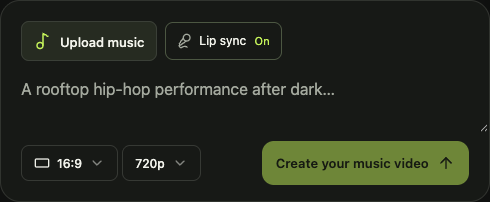
    Pixo’s public music upload form with lip-sync toggle, creative direction, aspect ratio and resolution controls
    Public music upload form, before generation · captured 17 Nov 2026. View source

    What you can control

    • Start with a rough idea in everyday language; a complete storyboard is optional.
    • Use conversation to shape the performer, setting, visual mood or a particular song section.
    • Keep successful scenes and request revisions to selected shots as the video takes shape.

    [12] [29] [30]

    The trade-off to check

    A free account is not a free finished video. Images, video generations and revisions spend the same credit budget; inspect the estimate for the whole project. [13] [12]

    Start with an idea. Refine it in chat.

    Start in everyday language
    “Use my photo as the singer in a music video set in a rainy city.”
    Shape a song section
    “Give the chorus brighter lighting, wider shots, and more movement.”
    Change one shot
    “Regenerate shot three with a closer view of the singer. Keep the other shots.”

    Illustrative requests based on documented features, not recorded product conversations. Check the result and credit estimate when revising. [29] [30]

    Basic $12.90 / month

    The live Monthly tab shows $12.90 promotional ($19.90 listed), with 1,000 credits/month. The Yearly tab shows $118.80 upfront ($9.90/month equivalent). Check the current checkout offer. [13] [12]

    What the trial gets you

    200 free credits, no credit card required. The music-video page says generation requires paid or purchased credits, or an eligible account trial. The free allocation does not establish how much of a full song you can finish. [13] [12]

    What creators report

    A specific credit-budget complaint

    A Trustpilot reviewer, r franco, reports that a paid general-video project consumed more credits than expected and remained unfinished. The reviewer also describes a disputed refund request. The post does not identify a comparable music-video task. [19]

    Watch Pixo’s official music-video examplesVendor-selected examples · no common test track [12]

    Research scope. Only one review was visible on that profile when checked. We did not locate a reproducible independent music-video comparison for Pixo in this research. Its feature description and official demos should not be read as a verified quality ranking. [19] [12]
  2. 02
    Shape visuals around the music

    An audio-reactive approach to bringing your music to life.

    Consider it when you want audio-reactive controls alongside a full-song Autopilot workflow. The model and editing approach can change the budget substantially. [4] [7] [43]

    Why it ranks here. Next for the breadth of its music-specific controls: full-song Autopilot, scene-level revisions and singing, plus separate audio-reactive editors. A creator account links a completed project with external editing. The higher entry price and model-dependent credits make it a considered choice. [7] [43] [4] [15] [5]

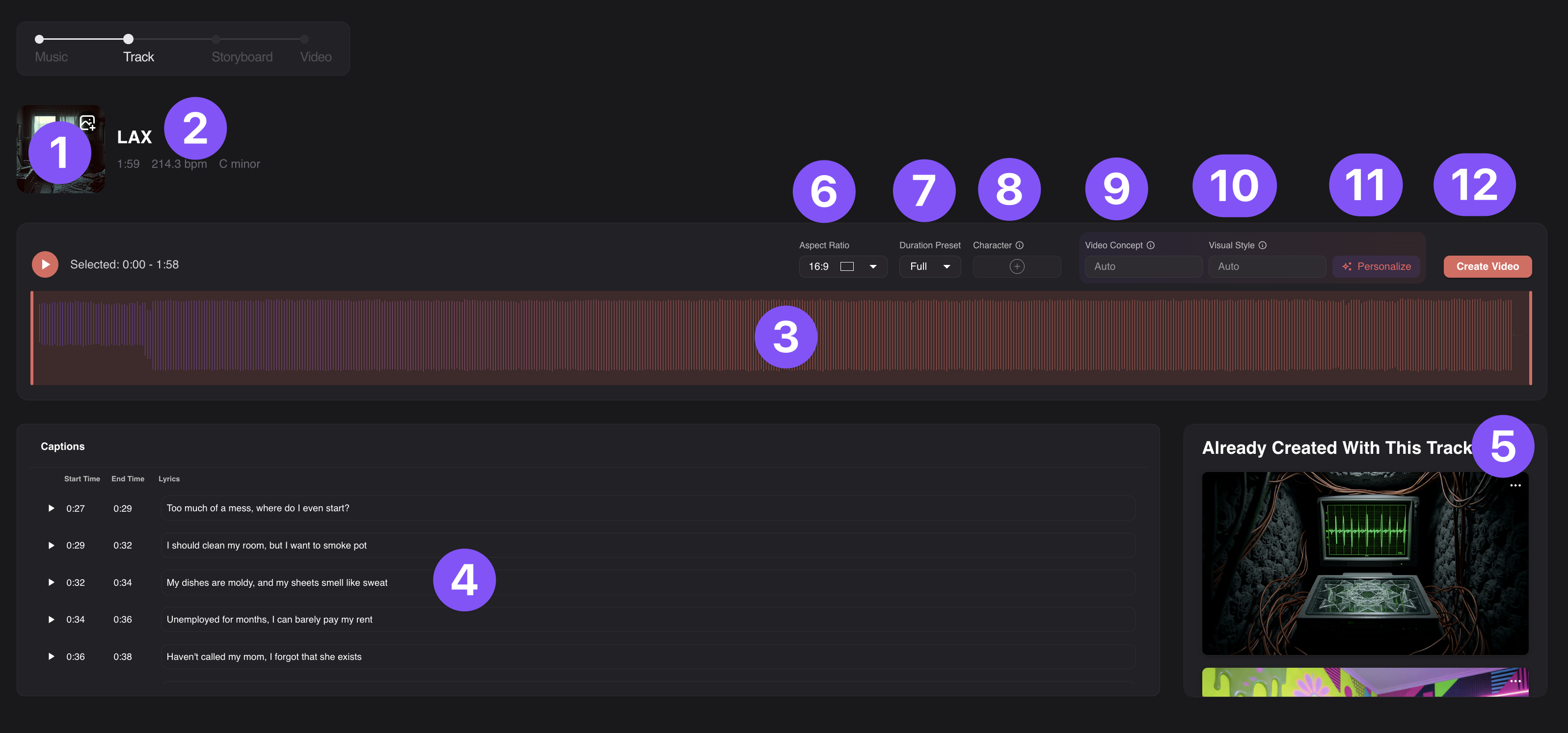
    Official Neural Frames Autopilot Track screen showing the waveform, lyric timings, character and visual-style controls
    Official annotated Track-screen screenshot · handbook updated 9 Apr 2026. View source

    What you can control

    • Autopilot supports reference characters, lyric timing and scene-level lip sync.
    • Separate editors provide timeline and audio-reactive controls for a more directed workflow.
    • Its music-video page also describes natural-language scene revisions; chat is not exclusive to one platform.

    [4] [7] [43]

    The trade-off to check

    The entry plan includes Autopilot, but the vendor recommends Ninja for full-length projects. Use its song-cost calculator before committing. [5] [6]

    Knight $39 / month

    2,400 credits/month. Annual Knight is $312 upfront ($26/month equivalent). Ninja is $99/month or $792/year and includes 7,200 credits plus 4K upscaling. [5] [6]

    What the trial gets you

    The help center describes enough trial credits for a couple of Autopilot storyboards or about 20 seconds with DreamShaper. It does not promise a complete, premium-model music video; confirm current signup and export limits. [5] [6]

    What creators report

    A finished project with extra editing

    Mind Echoes’ creator describes generating visuals for a six-minute rock track, then selecting sequences and editing timing, speed and transitions in CapCut. The post links the completed work; this was a mixed-tool workflow. [15]

    Keep a budget for discarded versions

    A subscriber in a four-tool discussion reports keeping two music videos and discarding two others during a $99 month. Durations and models are unspecified, so this is a spending anecdote, not a price-per-video benchmark. [16]

    Watch the creator’s finished EXIT videoMind Echoes · Neural Frames visuals, then manual CapCut editing [15]

  3. 03
    Build characters and direct a story

    A broader creative studio with a music-video entry point.

    Director connects character creation, song-led planning and scene edits. It is worth considering if your project needs more than a music visualizer. [8]

    Why it ranks here. Our next choice for directing a multi-scene story: saved characters, conversational edits and a structured editor support deliberate scene work. We prioritize that production flexibility over a simpler first draft; check Director’s own credit quote rather than the plan’s generic video count. [8] [9] [17]

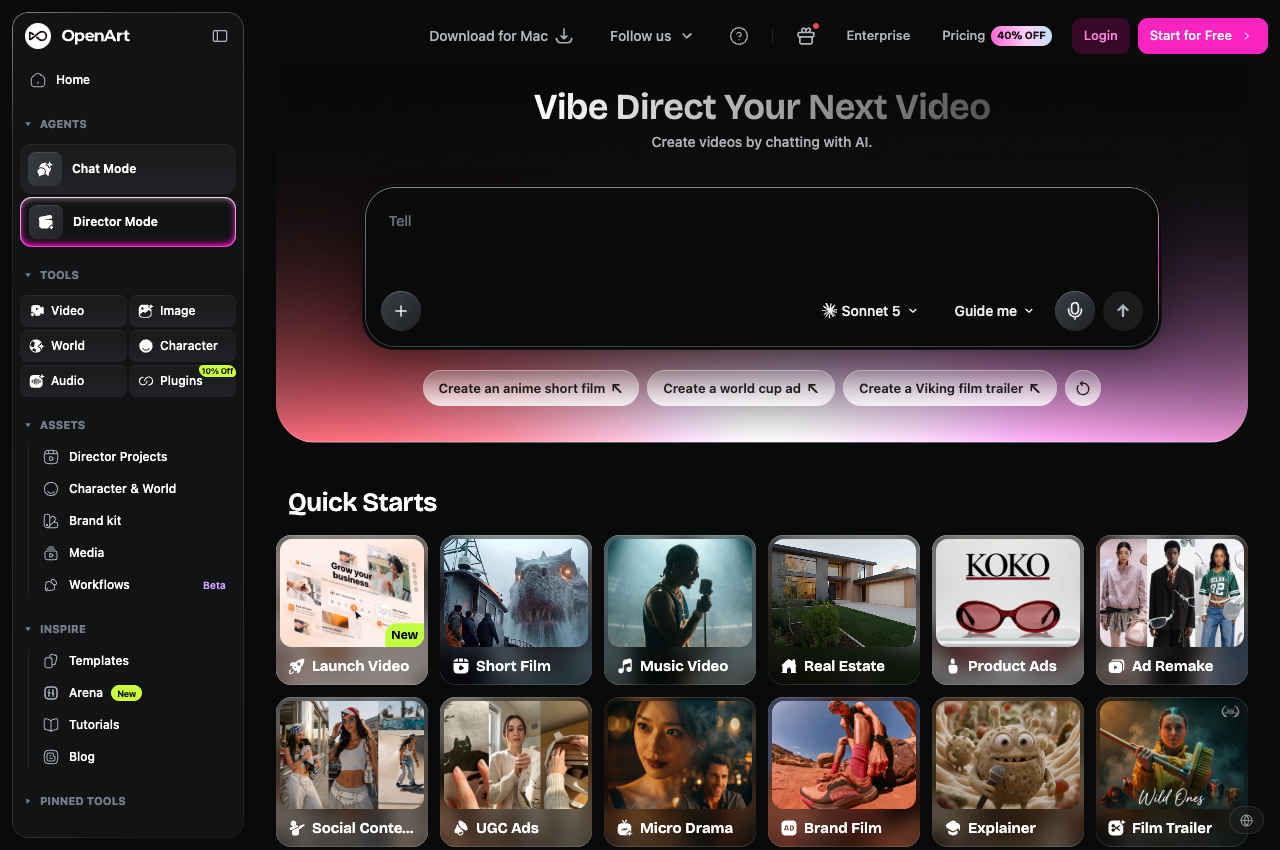
    OpenArt’s public Director interface with a conversation composer, character tools and Music Video quick start
    Public Director start screen · captured 17 Nov 2026. View source

    What you can control

    • Director describes full multi-scene projects up to five minutes from a song or brief.
    • Reusable characters and conversational edits sit alongside a Timeline view.

    [8]

    The trade-off to check

    The plan’s estimated video count explicitly excludes Director. Do not read “up to ~50 videos” as fifty complete music videos. [9] [10]

    Starter $14 / month

    4,000 credits/month. The annual view shows a limited first-year offer at $11/month equivalent; verify its billed total and renewal price at checkout. The monthly view is shown here for comparison. [9] [10]

    What the trial gets you

    Official guidance describes 40 trial credits over seven days, with no credit card required. These credits are not a promise of a full Director project. Paid plans explicitly list watermark-free output; free-export wording differs across vendor pages. [9] [10]

    What creators report

    A creator’s successful dance sequence

    Admirable_Creme_2785 reports using character and location references with Seedance 2.5 in Director and liking the dance movement. The creator describes drafting at lower resolution before upscaling, but does not recall the total credit cost. [17]

    Audio alignment and revision costs

    JerydSmith reports a music-video project with repeated revisions, credit consumption and misaligned audio segments. A team reply requested case details and said support findings were not yet confirmed. The complaint remains an individual account. [18]

    View the creator’s dance video and workflowCreator-posted example · not the same input as the other tools [17]

  4. 04
    Start with a music-first creator

    Music, dance and lyric-video workflows in one place.

    A practical place to explore music, dance and lyric-video formats from the same song. Budget for revisions as well as the first generation. [1] [3] [21]

    Why it ranks here. A strong route to a guided first music video, with Auto mode, a reviewable storyboard and chat changes in 2.0. It follows Neural Frames and OpenArt because this order prioritizes dedicated music controls and broader story-production tools. Choose it earlier if guided setup is your main need; test one revision before a full run. [21] [14]

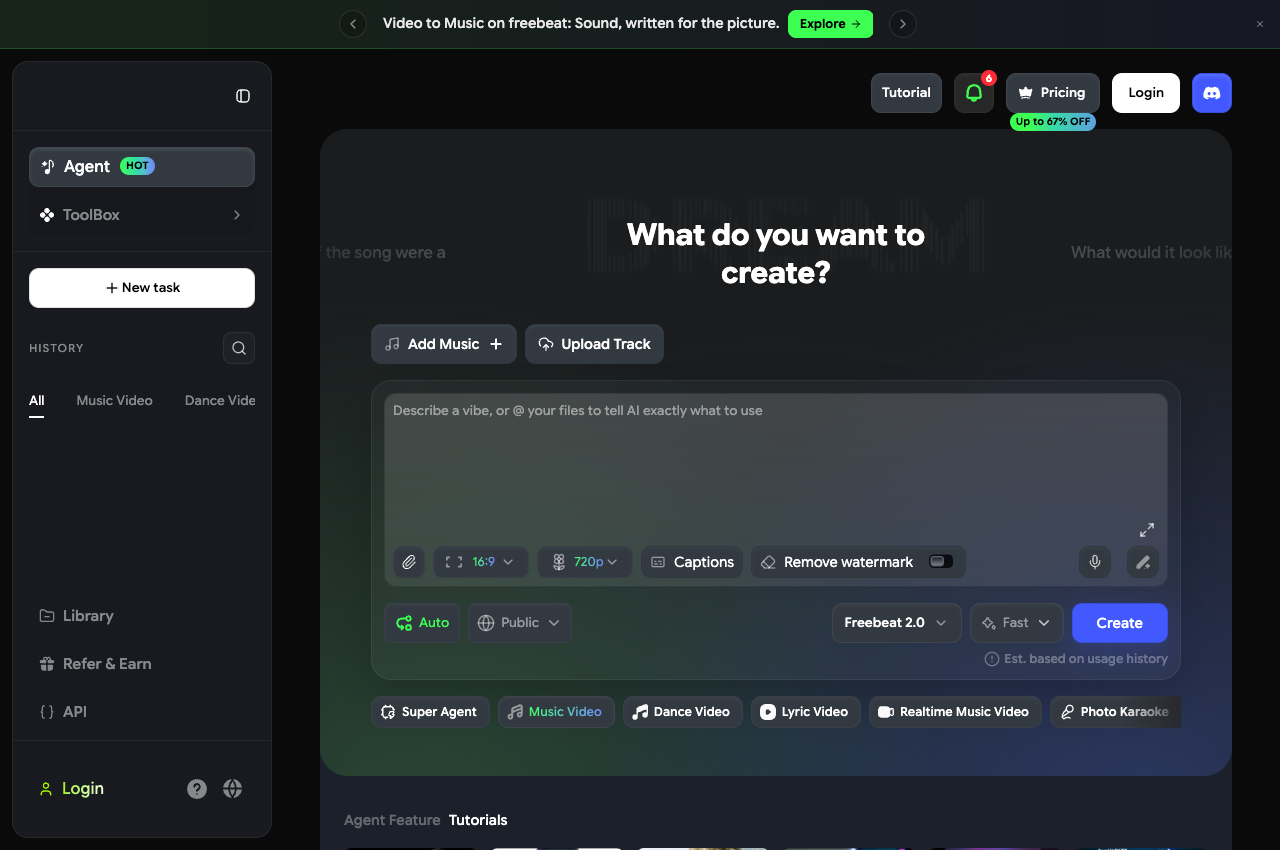
    freebeat’s signed-out music-video creator with audio upload, prompt, aspect-ratio and model controls
    Public music-video creator · captured 17 Nov 2026. View source

    What you can control

    • Audio upload and supported song links feed a music-focused workflow.
    • The creator exposes format, captions, watermark and model controls before generation.
    • Freebeat 2.0 adds Auto mode, a reviewable storyboard, conversational changes and a Studio timeline.

    [1] [3] [21]

    The trade-off to check

    Basic is billed weekly. Its displayed 720p limit and available credits matter more than the entry price alone. [2] [3]

    Basic $4.99 / week

    Promotional price; $6.99/week is shown as the listed price. Basic is billed for one week and includes 1,990 credits. Pro shows $26.99/month promotional ($34.99 listed), with 10,000 credits. [2] [3]

    What the trial gets you

    500 free credits are advertised. The public composer’s Remove watermark option is off by default; the Basic plan explicitly includes removal. A complete free music-video export was not verified. [2] [3]

    What creators report

    Getting to a first result

    SuccessfulPie9317 describes finding it easy to make watchable short music videos. This is an individual beginner’s account, without a controlled comparison or saved settings. [14]

    Revisions can be the hard part

    In the same discussion, EyemanReel reports repeated storylines despite revision prompts, alongside waiting and credit consumption. Treat it as a reason to test an edit on your own track before buying more credits. [14]

    Watch a third-party freebeat / OpenArt comparisonArtturi Jalli · affiliate links disclosed · 10 Jul 2026 [20]

  5. 05
    Song uploads, editable storyboards and singing videos

    Upload your song, approve the cast and storyboard, then refine individual shots with text direction.

    Solmi brings song analysis, casting, storyboard approval and rendering into one music-video workflow. It also supports plain-language direction and revisions to individual shots. [35] [36]

    Why it ranks here. A coherent song-to-video route with cast approval, chat direction and individual-shot edits. Its short free sample is useful for a first check, but the independent experience in our source set is thin. We place it ahead of Kaiber for an integrated singing-video workflow, without claiming better output quality. [36] [38] [40] [34] [41]

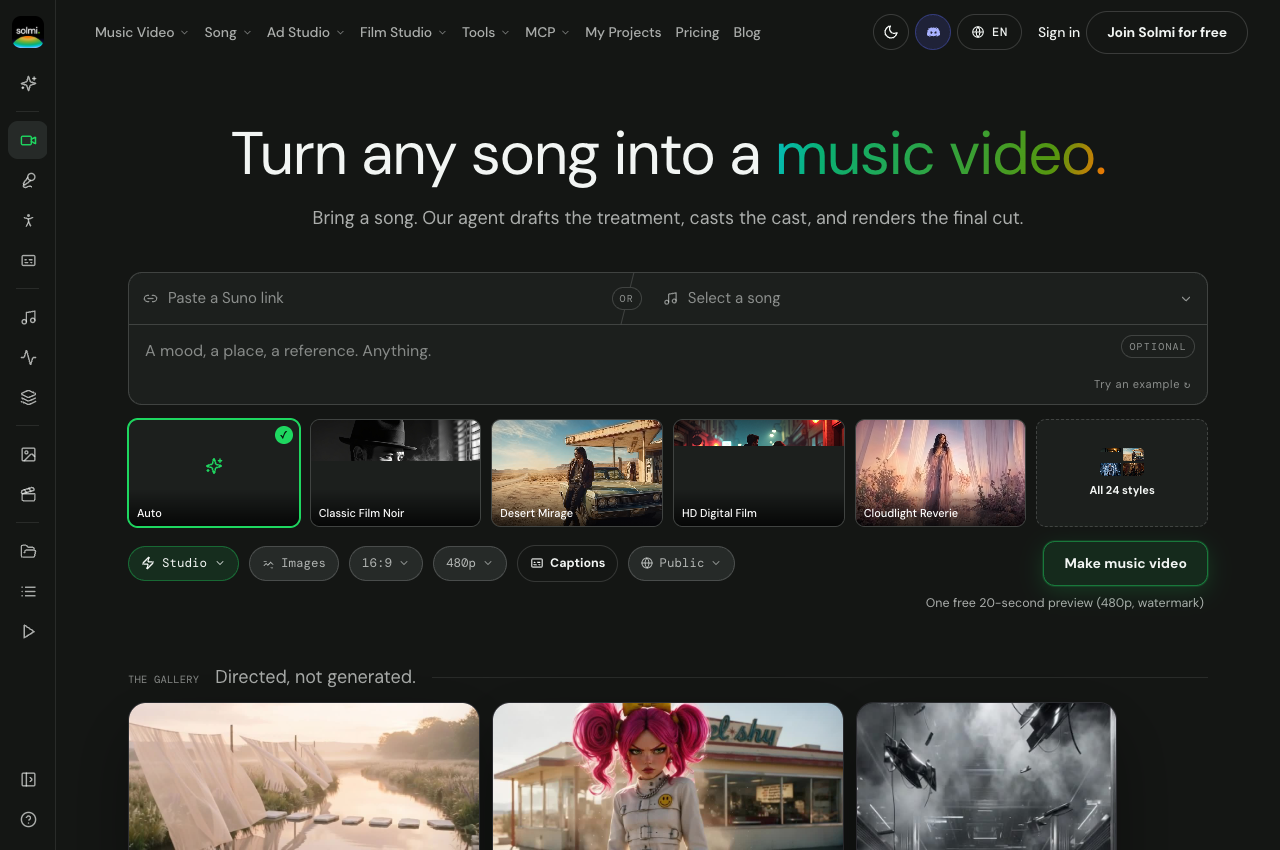
    Solmi public music-video creation form with song upload and visual direction controls
    Public music-video creation form · captured 18 Nov 2026. View source

    What you can control

    • Upload an MP3 or WAV, including a track downloaded from Suno.
    • Approve performer references and the storyboard; revise individual shots through text direction.
    • Use automatic lyric detection and lip sync, with landscape or vertical exports.

    [35] [36]

    The trade-off to check

    The one-time music-video allowance is separate from the daily song-credit refill. Paid subscription credits reset each billing cycle; regenerated images and video shots consume credits, so leave room for revisions. [37] [38] [36]

    Plus $35/month · 2,000 credits

    Monthly billing: Creator is $85 for 5,500 credits; Pro starts at $135 for 9,000. Paid plans include 720p/1080p and watermark-free output. One-time packs start at $30 for 1,500 credits, valid for 12 months without auto-renewal. [37] [38] [36]

    What the trial gets you

    A new website account gets 100 one-time music-video credits for a 20-second, 480p watermarked sample, with no card required. Daily credits refill to 10 for songs; this does not replenish the full music-video allowance. The free video is for personal use. [37] [38] [36]

    What creators report

    A positive beat-sync report, without a linked output

    In a Reddit discussion, guskk1975 said Solmi worked well for cutting to a song’s beat. Another participant asked to see a finished project; the captured exchange did not provide one. This is a single unverified recommendation, not evidence of a measured advantage. [40]

    Read the official Director workflowDescribes storyboard approval and chat direction. Vendor claims have not been validated in our own production run. [36]

  6. 06
    Song-led montages and multi-scene sequences

    Choose a song-led montage, a multi-scene sequence or a lyric video, then work with the generated assets.

    Choose Kaiber when you want a dedicated song-to-video workflow with a choice of montage, changing scenes or lyrics on screen. Canvas and Editor provide additional production tools. [31] [33] [34] [32] [41]

    Why it ranks here. A specialist choice for a defined montage or changing scenes. It comes later for the general full-song task because capabilities and limits vary by workflow, and singing uses a separate Canvas route. For a stylized montage without singing, it may be the more relevant starting point. [31] [33] [34] [41]

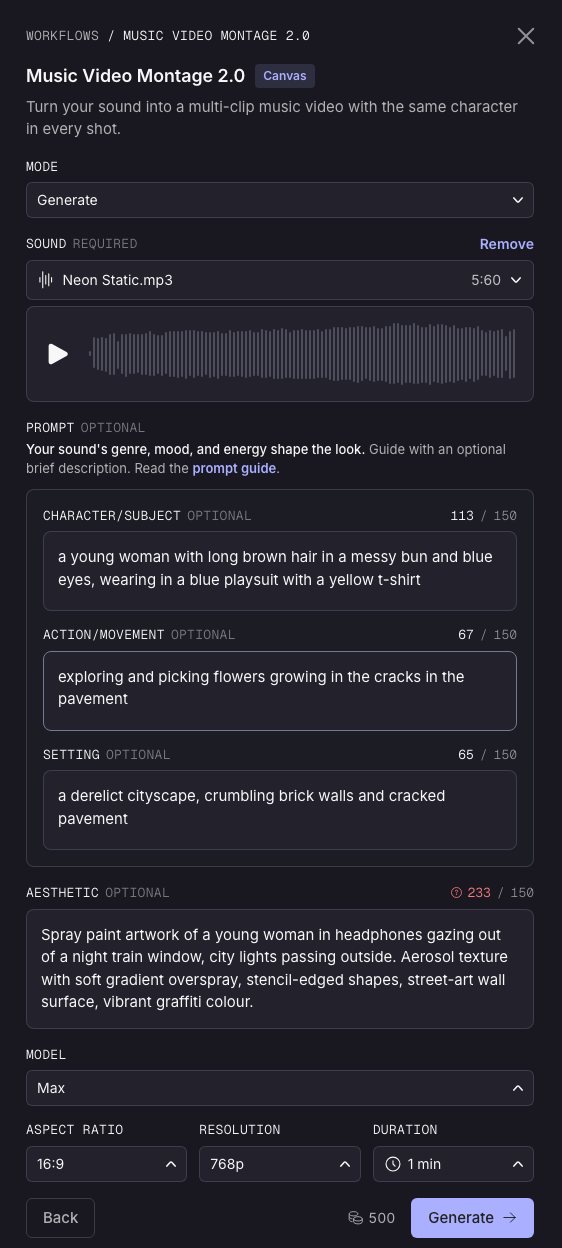
    Kaiber Music Video Montage settings shown in its official workflow guide
    Official Montage 2.0 setup screenshot · retrieved 18 Nov 2026. View source

    What you can control

    • Montage holds a visual theme; Sequence moves the subject through different settings.
    • Reference images guide the look; the 2.0 workflows build character reference sheets.
    • Keep reusable assets and finish the cut in Editor. Creator adds Beat Sync for batches and auto-clipping.
    • Canvas has separate Image and Video Lip Sync tools; do not assume every music-video workflow includes singing.

    [31] [33] [34] [32] [41]

    The trade-off to check

    Starter excludes Beat Sync and premium models. Confirm eligibility and the credit quote for the exact workflow before subscribing; the entry subscription is not a full-song production quote. [42] [32]

    Starter $10/month · Creator $29/month

    Monthly billing: Starter includes 500 credits; Creator includes 1,500. Annual equivalents are $8 and $23/month, paid annually. Unused credits roll over. Creator includes commercial-use rights; check the applicable terms. [42] [32]

    What the trial gets you

    A $5, five-day trial includes 500 credits and Canvas, Editor and Beat Sync access. It converts to Creator Monthly after five days unless cancelled. This is a paid trial. [42] [32]

    What creators report

    Stylized loops, with a version caveat

    The Blogging Musician’s comparison describes attractive short Kaiber loops, but criticizes character stability and song structure. Its account does not establish performance of the current Montage 2.0 or Sequence 2.0 workflows, which now document reference sheets and song-led scenes. Use it as a reason to check continuity on your own track. [39] [33] [34]

    Read the official Montage walkthroughVendor instructions and interface examples; not our test or an independent quality comparison. [33]

How we order these tools.

Independent musicians and creators making a complete music video from a finished song.

Editorial recommendations for workflow fit. Pixo is our conversation-led first pick; the other tools are ordered for the same full-song task, with their different strengths and limitations explained.

  1. Finish the song. Look for a documented route from audio through planning, generation and export.
  2. Make a useful revision. Look for cast references, storyboard review and changes to individual shots.
  3. Work with the music. Distinguish beat-aware scenes, audio reactivity and singing support; they solve different problems.
  4. Understand the commitment. Check the trial, billing period, workflow eligibility and revision charges before comparing entry prices.
  5. Inspect the evidence. Use current documentation to establish controls and attributed creator accounts to identify checks. Sparse independent evidence lowers confidence.

This is an editorial ranking, not a scored benchmark. We use documented workflows and attributed experiences to recommend a starting point; output quality, revision success and cost per finished song have not been measured on shared inputs.

Ranking rationale reviewed 18 November 2026. We checked official product pages, public creation interfaces and live pricing on . Kaiber and Solmi product and pricing sources were checked on 18 November 2026. Workflow documentation was revisited for this ranking review; older price checks retain their original dates.

Creator reports are attributed experiences, not verified measurements or a representative survey. Some describe older versions or workflows with extra editing. A vendor demo, an affiliate-supported video and a customer complaint each answer different questions; their source type is stated.

The example videos use different songs and inputs. Use them to explore a workflow, then check a representative section and one revision with your own song.

Sources you can inspect.

Product and pricing research retrieved 17 November 2026; Pixo chat-workflow sources and Kaiber/Solmi research checked 18 November 2026. Publication or update dates are shown where confirmed; changing offers and account-specific limits should be checked at the source.

  1. freebeat: music-video workflowsOfficial product page
  2. freebeat: live pricing and trial offerOfficial pricing and trial terms
  3. freebeat: public music-video creatorPublic product interface
  4. Neural Frames: creation modesOfficial product page
  5. Neural Frames: plans and cost calculatorOfficial pricing; monthly and yearly views
  6. Neural Frames: free-trial scopeOfficial help · updated 2026-01-19
  7. Neural Frames: the four stages of AutopilotOfficial handbook and annotated interface screenshot · updated 2026-04-09
  8. OpenArt: Director modeOfficial product page
  9. OpenArt: plans, credits and annual promotionOfficial pricing; browser-rendered monthly view
  10. OpenArt: trial and character workflowVendor-authored guide
  11. OpenArt: public Director start screenPublic product interface
  12. Pixo: music-video workflow and upload limitsOfficial product page and public creation form
  13. Pixo: plans, credits and free accountOfficial pricing; browser-rendered monthly and yearly views
  14. Creators discuss freebeat in r/SunoAIUnverified community accounts; mixed experiences · published 2026-01-14
  15. Mind Echoes — EXIT: Neural Frames and manual editingCreator-reported workflow with linked work · published 2026-11-09
  16. Four-tool discussion: a Neural Frames subscriber’s experienceUnverified community account · published 2026-01-16
  17. A creator’s OpenArt Director dance videoCreator-reported result on a vendor community
  18. OpenArt Director: reported revision and audio-alignment issuesUnverified customer complaint with a support follow-up
  19. Pixo: one customer’s credit-budget complaintOne unprompted customer review; general video project · published 2026-08-02
  20. Artturi Jalli: I Tried Every AI Music Video Generator So You Don’t Have ToThird-party video comparison; creator discloses affiliate links · published 2026-07-10
  21. Pixo: creating and refining video through conversationOfficial product workflow
  22. Pixo: music-video planning, approval and revisionsOfficial workflow guide; illustrative project, not a benchmark
  23. Kaiber: choosing a music-video workflowOfficial workflow documentation
  24. Kaiber: plans, credits and paid trialOfficial plan documentation
  25. Kaiber: Music Video Montage 2.0Official workflow guide and interface image
  26. Kaiber: Music Video Sequence 2.0Official workflow documentation
  27. Solmi: music-video generatorOfficial product description and public creation interface
  28. Solmi: music-video DirectorOfficial workflow and credit documentation
  29. Solmi: live pricingOfficial pricing page · monthly billing selected
  30. Solmi: free music-video allowanceOfficial trial conditions
  31. The Blogging Musician: six video generators on original tracksThird-party comparison · version and testing claims not independently verified
  32. Reddit: music-video tool discussionAnonymous user discussion · identity and affiliations unverified
  33. Kaiber: Lip Sync in CanvasOfficial workflow documentation
  34. Kaiber: live pricingOfficial pricing page · monthly billing selected
  35. freebeat: Agent 2.0 workflowOfficial workflow documentation · updated 2026-08-25
  36. Neural Frames: full-song and short-form music videosOfficial product description