

The short version
Choose Kaiber when you want a dedicated song-to-video workflow with a choice of montage, changing scenes or lyrics on screen. Canvas and Editor provide additional production tools. [31] [33] [34] [32] [41]
Why it ranks here. A specialist choice for a defined montage or changing scenes. It comes later for the general full-song task because capabilities and limits vary by workflow, and singing uses a separate Canvas route. For a stylized montage without singing, it may be the more relevant starting point. [31] [33] [34] [41]
Song-led montages and multi-scene sequences
- Montage holds a visual theme; Sequence moves the subject through different settings.
- Reference images guide the look; the 2.0 workflows build character reference sheets.
- Keep reusable assets and finish the cut in Editor. Creator adds Beat Sync for batches and auto-clipping.
- Canvas has separate Image and Video Lip Sync tools; do not assume every music-video workflow includes singing.
Features & the actual interface
These capabilities are described by Kaiber. The image below shows the interface identified in its caption.
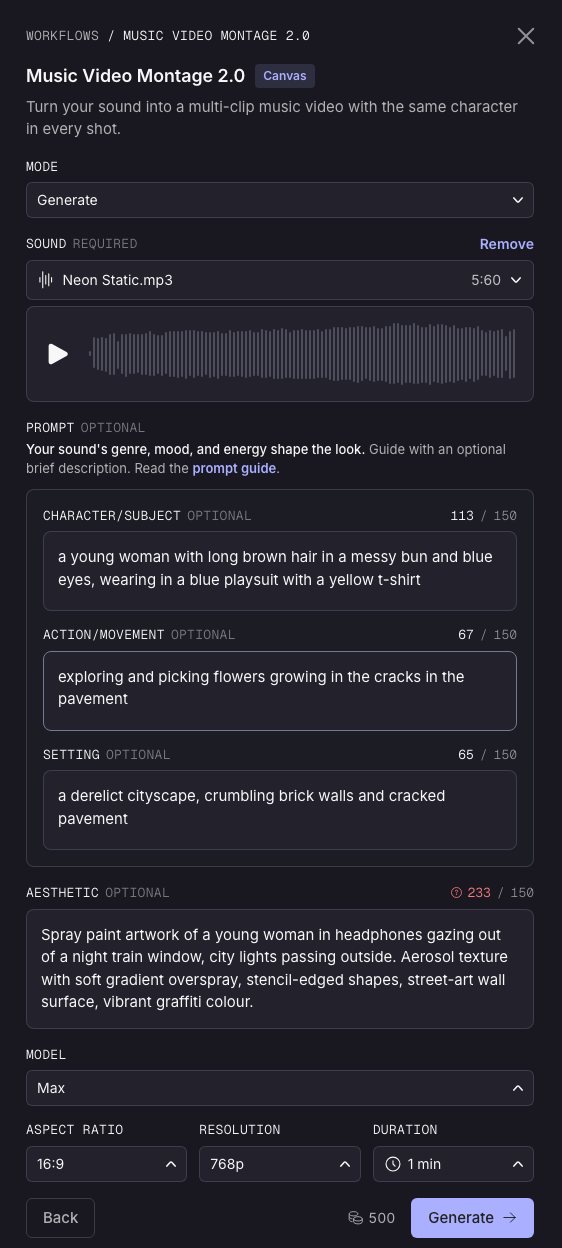
- Song & timing
- Song-informed scenes. Sequence lists up to 4 minutes; the Montage 2.0 guide lists up to 3. Confirm the selected workflow. [34] [33]
- Singing & characters
- Reference sheets in 2.0 workflows. Sequence does not lip-sync; use the separate Canvas Image/Video Lip Sync workflow for singing. [34] [41]
Pricing & trial
Prices in USD, checked . Billing periods and promotional offers are stated below.
Subscription credits do not establish the cost of a finished music video. Model choice, duration, discarded generations and edits can change the total.
Check current pricingWhat creators report
Public accounts with their context and limitations. These are individual experiences, not a representative survey or our own test results.
Stylized loops, with a version caveat
The Blogging Musician’s comparison describes attractive short Kaiber loops, but criticizes character stability and song structure. Its account does not establish performance of the current Montage 2.0 or Sequence 2.0 workflows, which now document reference sheets and song-led scenes. Use it as a reason to check continuity on your own track. [39] [33] [34]
Read the official Montage walkthroughVendor instructions and interface examples; not our test or an independent quality comparison. [33]
Before you try it
The trade-off to check
Starter excludes Beat Sync and premium models. Confirm eligibility and the credit quote for the exact workflow before subscribing; the entry subscription is not a full-song production quote. [42] [32]
A useful first check
Does your selected workflow preserve the performer and pacing across a chorus, and does it support singing if you need it?
- Start with a short, representative section of your own track.
- Check the chosen model’s credit estimate and leave room for one revision.
- Inspect the export resolution, watermark and current plan conditions before paying for a full project.
Compare the other approaches
 PixoChat to create AI music videos
 Neural FramesShape visuals around the music
OpenArtBuild characters and direct a story
freebeatStart with a music-first creator
 SolmiSong uploads, editable storyboards and singing videos
Sources & research notes
Prices checked 18 November 2026. Ranking rationale reviewed 18 November 2026. Each link below identifies the official description or public account behind this profile.
- Kaiber: choosing a music-video workflowOfficial workflow documentation
- Kaiber: plans, credits and paid trialOfficial plan documentation
- Kaiber: Music Video Montage 2.0Official workflow guide and interface image
- Kaiber: Music Video Sequence 2.0Official workflow documentation
- The Blogging Musician: six video generators on original tracksThird-party comparison · version and testing claims not independently verified
- Kaiber: Lip Sync in CanvasOfficial workflow documentation
- Kaiber: live pricingOfficial pricing page · monthly billing selected
This profile draws on official documentation and attributed creator reports. Read how we use this evidence.
Read the source notesSave this page
Save this page to revisit the sources and advice, or share it with someone working on a music video.