

The short version
Our first pick for creating music videos through chat. Start with your song and an idea in everyday language; Pixo helps develop the storyboard and create the video. Refine the performers, scenes or individual shots by describing what you want to change. [12] [29] [30]
Why it ranks here. Our conversation-led first pick for shaping a song into a video and requesting shot changes in everyday language. This is a workflow recommendation: independent music-video evidence is limited, and chat direction is also available in other tools on this list. [30] [29] [19] [43] [8] [21] [36]
Chat to create AI music videos
- Start with a rough idea in everyday language; a complete storyboard is optional.
- Use conversation to shape the performer, setting, visual mood or a particular song section.
- Keep successful scenes and request revisions to selected shots as the video takes shape.
Start with an idea. Refine it in chat.
- Start in everyday language
- “Use my photo as the singer in a music video set in a rainy city.”
- Shape a song section
- “Give the chorus brighter lighting, wider shots, and more movement.”
- Change one shot
- “Regenerate shot three with a closer view of the singer. Keep the other shots.”
Illustrative requests based on documented features, not recorded product conversations. Check the result and credit estimate when revising. [29] [30]
Features & the actual interface
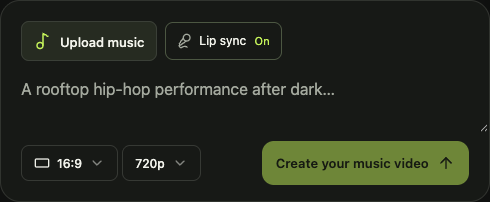
These capabilities are described by Pixo. The image below shows the interface identified in its caption.
- Workflow
- Chat from a song and idea to a storyboard, generated scenes and an assembled video. [29] [30]
- Song & timing
- Lyrics, song sections and vocal timing; upload up to 200 MB. [12]
- Singing & characters
- Singing lip sync; assign characters to different vocal parts. [12]
- Editing control
- Request changes to performers, settings or individual shots through conversation. [29] [12]
- Export
- Basic lists 1080p; Pro/Max list 4K. Model and settings still matter. [13]
Pricing & trial
Prices in USD, checked . Billing periods and promotional offers are stated below.
Subscription credits do not establish the cost of a finished music video. Model choice, duration, discarded generations and edits can change the total.
Check current pricingWhat creators report
Public accounts with their context and limitations. These are individual experiences, not a representative survey or our own test results.
A specific credit-budget complaint
A Trustpilot reviewer, r franco, reports that a paid general-video project consumed more credits than expected and remained unfinished. The reviewer also describes a disputed refund request. The post does not identify a comparable music-video task. [19]
Watch Pixo’s official music-video examplesVendor-selected examples · no common test track [12]
Before you try it
The trade-off to check
A free account is not a free finished video. Images, video generations and revisions spend the same credit budget; inspect the estimate for the whole project. [13] [12]
A useful first check
Can a specific chat request improve one shot while keeping the scenes you already like?
- Start with a short, representative section of your own track.
- Check the chosen model’s credit estimate and leave room for one revision.
- Inspect the export resolution, watermark and current plan conditions before paying for a full project.
Compare the other approaches
 Neural FramesShape visuals around the music
OpenArtBuild characters and direct a story
freebeatStart with a music-first creator
 SolmiSong uploads, editable storyboards and singing videos
 KaiberSong-led montages and multi-scene sequences
Sources & research notes
Prices checked 17 November 2026. Ranking rationale reviewed 18 November 2026. Pixo’s chat workflow was checked on 18 November 2026. Each link below identifies the official description or public account behind this profile.
- OpenArt: Director modeOfficial product page
- Pixo: music-video workflow and upload limitsOfficial product page and public creation form
- Pixo: plans, credits and free accountOfficial pricing; browser-rendered monthly and yearly views
- Pixo: one customer’s credit-budget complaintOne unprompted customer review; general video project · published 2026-08-02
r franco reports unexpectedly high credit consumption. One review was visible; no reproducible music-video setup. No aggregate score is used.
- Pixo: creating and refining video through conversationOfficial product workflow
- Pixo: music-video planning, approval and revisionsOfficial workflow guide; illustrative project, not a benchmark
- Solmi: music-video DirectorOfficial workflow and credit documentation
- freebeat: Agent 2.0 workflowOfficial workflow documentation · updated 2026-08-25
- Neural Frames: full-song and short-form music videosOfficial product description
This profile draws on official documentation and attributed creator reports. Read how we use this evidence.
Research scope. Only one review was visible on that profile when checked. We did not locate a reproducible independent music-video comparison for Pixo in this research. Its feature description and official demos should not be read as a verified quality ranking. [19] [12]
Read the source notesSave this page
Save this page to revisit the sources and advice, or share it with someone working on a music video.